
Q: What is a Service Request (SR)?
Answer:
Service Request (SR) is a formal request raised by clients for changes, additions, or issue handling related to any Infinitium product, in both UAT and production environments.
Q: What are some examples of Service Requests?
Answer:
Typical incoming Service Requests may include (but are not limited to):
Card BIN Management
User Management
Authentication Page Updates
Technical or Maintenance Activities
Key Enrollment / Key Retrieval
RBA (Risk-Based Authentication) Setting Changes
Retrieve SMS OTP
SMS OTP Template Updates
UAM Access Updates
Merchant Onboarding
FDS Merchant Blocking request
Others
Q: How do I prepare the Service Request Form (SRF)?
Answer:
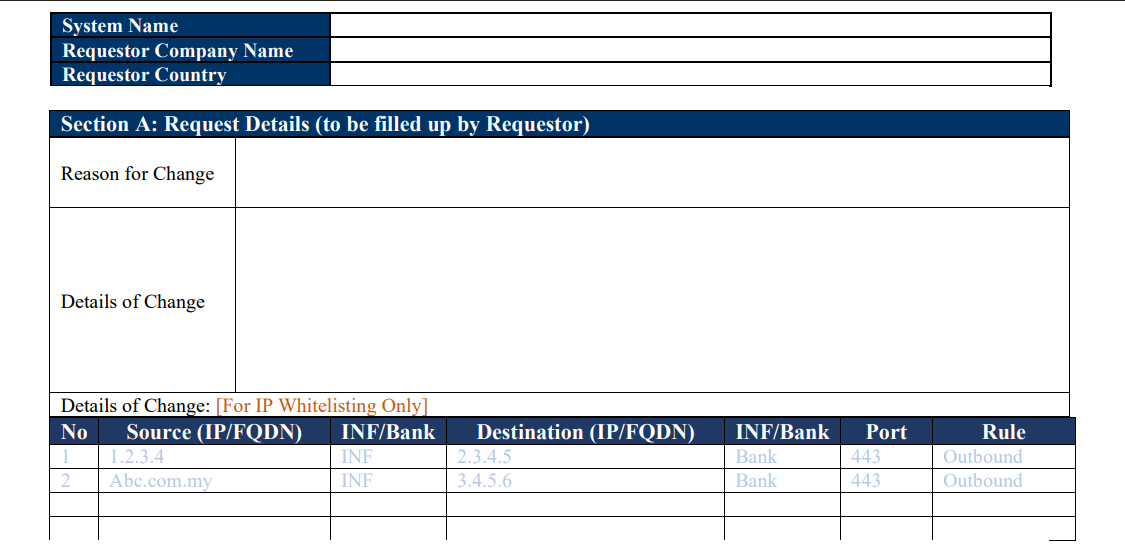
Company & System Details
Fill in your company information and the system name where the change is required.
Section A – Request Details
Provide the reason and full details of the requested change.
For IP whitelisting, ensure all required details (IP source, IP destination, ports, etc.) are filled in the provided table
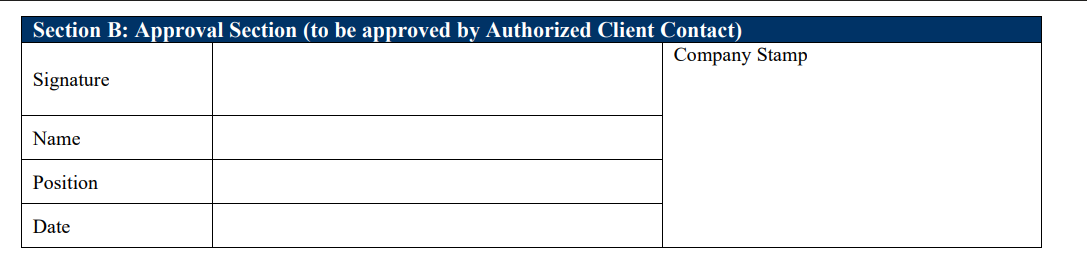
Section B – Approval
This section must be signed by the bank’s authorized PIC (Person-in-Charge) along with the official company/department stamp.
Sections C & D – Infinitium Use
These sections will be completed by Infinitium.
Q: How do I submit the Service Request Form (SRF)?
Answer:
Upon completing the Service Request Form, you may send it to Support@infinitium.com for review and processing.
Note:
Always use the latest version (v1.5) of the SRF. If you don’t have one, please contact Infinitium Support (Support@infinitium.com) to obtain the updated form.